 August 6, 2026
Google Ads has introduced a new tool for lead generation advertisers called Lead Journey Mapping. It appeared on a newly published Google Ads help page, giving advertisers visibility into a feature that had not been formally documented before.
Lead Journey Mapping is a visual, drag and drop tool that lets you map a customer’s full journey inside Google Ads, from the first click to a closed deal. For lead generation advertisers, it addresses a common tracking problem: Google Ads can see when someone fills out a form, but it has no visibility into what happens after that, such as whether the lead was contacted, qualified, or converted into a customer.
Search Engine Roundtable reports that the underlying tool page has existed since at least June 9, 2026, well before the help documentation appeared on July 29, 2026, which is usually the first real signal that a feature is moving toward a wider rollout.
If you manage lead generation campaigns, here is what the tool does, what Google has and has not confirmed about it, and how to set it up.
What is Lead Journey Mapping
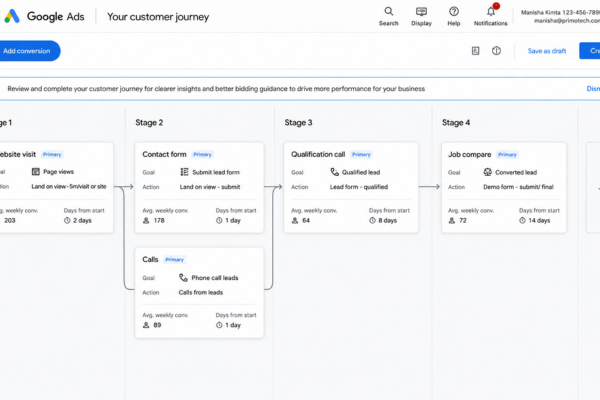
Lead Journey Mapping is a workspace inside Google Ads where you build a visual map of the stages a lead moves through before becoming a customer. Google describes it as a tool that helps advertisers visualize touchpoints and align campaign bidding with deep-funnel business goals.
Traditionally, Google Ads could only optimize using the conversion events it could see, such as form submissions, phone calls, or website actions. Everything that happened afterward, including qualification, negotiation, and the closed deal, typically stayed inside a separate CRM. That gap is what this tool is built to close.
The interface itself states the goal directly: reviewing and completing your customer journey gives you clearer insights and better bidding guidance, aimed at driving more performance for your business.
The four documented stages
Google’s help page names four stages that make up the journey map:
| Journey stage | What it represents | Visible to Google Ads by default |
| Website visit | A pageview on the advertiser’s site | Yes, with a site tag in place |
| Contact form or phone call | The lead makes first contact | Yes, for on-site forms and tracked calls |
| Qualification call | Sales decides if the lead is worth pursuing | No, requires an offline conversion import |
| Job completed | The work is delivered and paid for | No, requires an offline conversion import |
This table captures the real value of the tool in plain terms. The first two stages already flow into Google Ads automatically. The last two do not and closing that gap is the actual point of building the map. Businesses with more complex sales cycles, using stage names like MQL, SQL, opportunity, or closed-won, can relabel the four stages to match their own CRM workflow.
Why did Google introduce this feature
Lead generation has always been harder to measure than ecommerce. An online store can tell Google the exact moment a purchase happens. A lead generation business depends on sales teams, CRM systems, calls, and follow-up meetings before revenue actually shows up, which means Google Ads can register hundreds of form submissions without knowing which ones ever became paying customers.
Lead Journey Mapping is aimed at that visibility gap. Instead of judging a campaign purely on the number of leads it generates, advertisers can lay out the full journey and see where prospects drop off and which stages actually contribute to revenue.
Key details of the feature
A few specifics stand out from Google’s documentation and early reporting on the tool:
Visual drag and drop: Advertisers build their own sales funnel on the canvas, using stages that match their business, such as website visits, form submission, sales contact, qualified lead, proposal sent, and deal won.
Comprehensive integration: The tool pairs conversion actions Google Ads already tracks, such as ad clicks and phone calls, with offline events, non-tracked steps, conversion values, and conversion delays.
Actionable outcomes: By defining specific funnel stages, businesses can see exactly where momentum stops or prospects drop off, making leakage in the lead-to-sale cycle easier to pinpoint.
Better bidding guidance: Google’s own interface copy states that completing your customer journey leads to clearer insights and better bidding guidance over time.
How Lead Journey Mapping works
Setting up the tool follows a simple sequence. It starts with defining the stages that matter most to your business, then connects those stages to your existing conversion data, and finally uses offline imports to fill in what Google Ads cannot see on its own.
Step 1: Locate the tool in your account
Find Lead Journey Mapping under the tools and settings menu, in the measurement or conversions section. Since this is a limited rollout, Google has not published navigation screenshots yet. If you do not see it immediately, check under Goals or Conversions, as its placement may still change.
Step 2: Map your sales stages
Using the drag and drop canvas, lay out the stages your leads move through, starting from Google’s four documented stages: website visit, contact form or call, qualification call, and job completed. Rename them to match your own sales process if it differs.
Step 3: Add touchpoints and conversion delays
For each stage, add relevant metrics and the typical time gap between them. This is what separates the map from a simple flowchart. It ties your journey to real conversion timing rather than just a visual sequence.
Step 4: Import offline conversions to close tracking gaps
Website visits and form fills are already visible to Google Ads. Qualification calls and completed jobs are not, unless you close that gap using Enhanced Conversions for Leads or Offline Conversion Import, both of which feed CRM or sales outcomes back into Google Ads.
Step 5: Review your funnel insights
With the map complete and gaps closed, use it to identify exactly where leads drop off and where your Google Ads conversion tracking does not match your actual sales pipeline.
How it supports Journey-Aware Bidding
Lead Journey Mapping also lays groundwork for Google’s broader shift toward full funnel bidding, most visibly through Journey-Aware Bidding, announced at Google Marketing Live. That feature lets Smart Bidding on Target CPA campaigns learn from the entire lead to sale journey rather than relying on an early signal like a form fill.
That kind of bidding only works well when conversion tracking is clean and complete, and most accounts fall short there. Lead Journey Mapping looks built to help with exactly that.
It is worth being precise about what Google has actually confirmed. The documentation says the tool helps align bidding with deep-funnel goals, but it does not state that building the map changes bidding on its own. At this stage, it reads as a planning and visualization tool first, with the bidding upside arriving once your tracking is in place.
| Traditional tracking | Lead Journey Mapping |
| Optimizes around form submissions | Maps the complete lead journey |
| Limited funnel visibility | Full-funnel visibility |
| Online conversions only | Online and offline conversions combined |
| Basic lead counting | Groundwork for revenue-focused optimization |
Why this matters for your campaigns
One of the biggest challenges in lead generation advertising is not getting leads. It is understanding their quality. A campaign might generate hundreds of enquiries, but if only a small share convert into customers, advertisers need to know exactly where that drop-off happens.
Lead Journey Mapping helps visualize those gaps by combining advertising data with sales milestones, instead of switching between Google Ads reports, CRM dashboards, and spreadsheets. It also creates stronger alignment between marketing and sales teams, since success can be measured by lead quality and pipeline progress rather than lead volume alone. For agencies managing lead generation accounts, this adds a layer of insight that goes beyond standard conversion tracking.
Things to keep in mind
- No confirmed bidding impact yet : Google has not stated that the map directly changes bidding. Treat it as a visualization and audit tool until that changes.
- It works with your existing tracking, not instead of it :The tool organizes and strengthens the conversion data you already have rather than replacing your current setup.
- Businesses with CRM and offline imports in place will benefit most : Accounts without any offline conversion tracking will see the biggest gaps on the map, but need Enhanced Conversions for Leads or Offline Conversion Import to close them.
- No availability date or market list: Google has not announced when this rolls out more broadly or which accounts and regions have access.
- The documentation is new, the feature may not be: The tool’s interface has reportedly existed since June 2026. The July 29 update is the help page explaining it, which typically signals a wider release is coming.
Conclusion
Lead Journey Mapping is another step in Google’s move toward full-funnel advertising for lead generation. Rather than judging a campaign on its first conversion alone, it gives advertisers a way to see how leads move through every stage of the sales journey, and where Google Ads still has blind spots.
For businesses with longer sales cycles, multiple qualification stages, or CRM-driven workflows, this tool offers a clearer view of what is actually working and helps prepare accounts for bidding features like Journey-Aware Bidding as they roll out more broadly.
The rollout is still limited, and Google has not confirmed a direct bidding impact yet. Even so, lead generation advertisers should start reviewing their conversion tracking and offline data now. Closing that visibility gap early will likely matter more for your account than any single bidding update Google ships this year.
Frequently asked questions
Is Lead Journey Mapping newly launched?
Not exactly. The tool’s interface has reportedly been live since June 9, 2026. What is new, as of July 29, 2026, is Google’s help documentation explaining how to use it.
Does building the map change how my campaigns bid?
Google has not confirmed this. The documentation says the tool helps align bidding with deep-funnel goals, but does not state that the map itself changes bidding behavior.
What stages does the map include?
Four documented stages: a website visit, a contact form submission or phone call, a qualification call, and a completed job.
Which of those stages can Google Ads see without extra setup?
Only the first two. Website visits and form fills or tracked calls are visible by default. Qualification calls and completed jobs require an offline conversion import.
Do I need to wait for the tool to appear in my account to get value from this?
No. The same four stages can be mapped manually to identify your tracking gaps before the tool becomes available in your account.